> For the complete documentation index, see [llms.txt](https://suisec.gitbook.io/suisec/llms.txt). Markdown versions of documentation pages are available by appending `.md` to page URLs; this page is available as [Markdown](https://suisec.gitbook.io/suisec/dryrun-plus/ux-pattern.md).
# UX Pattern
This section introduces common design patterns for integrating dryRunPlus into wallet applications.
Return Data Structure
```typescript
export interface Response {
dryRun: DryRunTransactionBlockResponse;
pass: boolean;
msg: String | undefined;
}
```
## Normal Transaction
When no transaction risks are identified, the `pass` value is `true`, and the wallet displays the `DryRunTransactionBlockResponse` information normally.
Normal Transaction
## Risky Transaction
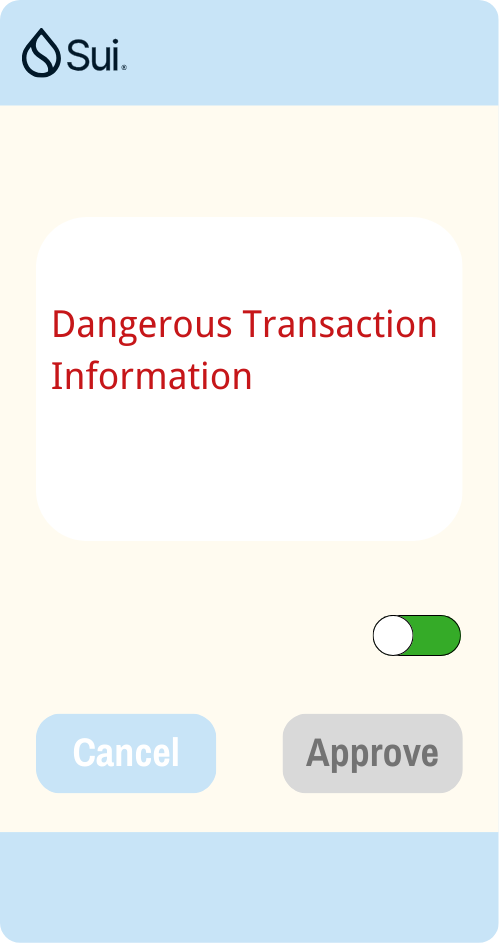
When transaction risks are identified, the `pass` value is `false`, and there are two patterns for intercepting user transaction signatures.
### Risk Pattern A
Pattern 1
Display the risk information in the transaction, that is, `Response.msg`. Change the transaction signature button to a warning color, such as red.
### Risk Pattern B
Pattern 2
Display the risk information in the transaction, that is, `Response.msg`. Change the transaction signature button to gray and make it unusable. If the user insists on trusting the transaction, they can first disable `dryRunPlus` by using the switch button.